How to check your iPhone’s battery health and cycle count
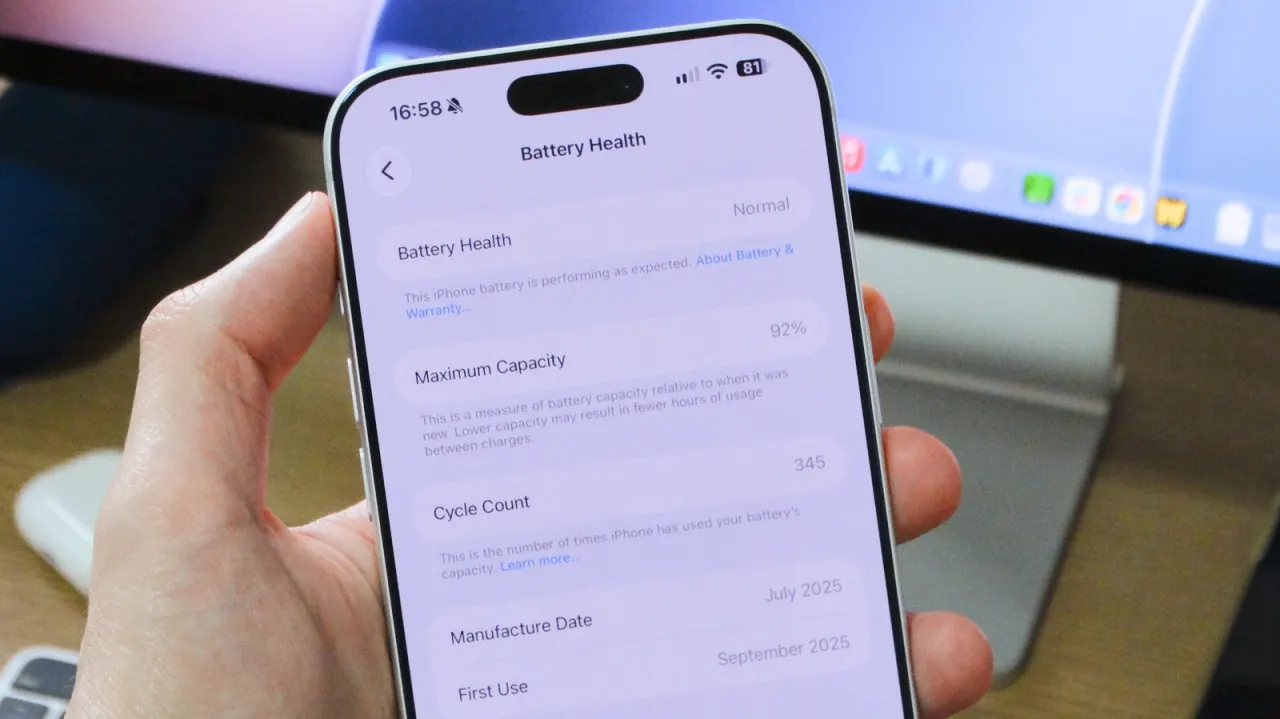
Apple builds tools into iPhones that let owners check battery health and, on newer models, cycle count, giving a clear picture of how much a battery has degraded. This matters both for existing owners deciding whether a battery needs replacing and for anyone buying a used iPhone, since a heavily cycled or degraded battery can mean reduced performance and shorter time between charges.
To check battery health, users open Settings, tap Battery, then Battery Health (called Battery Health & Charging on some older models like the iPhone 13), which shows a Maximum Capacity percentage. Apple designs batteries to retain up to 80% of original capacity, based on 1,000 full charge cycles for the iPhone 15 and later, or 500 cycles for older models; dropping below 80% may trigger performance management warnings. Cycle count is viewable directly in Settings on the iPhone 15 and newer, while older models require third-party tools such as coconutBattery. Enabling Optimised Battery Charging, and setting a charge limit on iPhone 15 or later, can help slow battery degradation over time.
In short
- iPhones let you check battery health and cycle count in Settings.
- 80% capacity is Apple's threshold; newer models rated for 1,000 cycles.
- Useful for deciding on battery replacement or vetting a used iPhone.
Explained simply
An iPhone battery holds less charge as it ages, so the phone may need charging more often. Battery health compares its current capacity with when it was new, while the cycle count records how much charging the battery has undergone.
Apple makes iPhones and builds battery information into their Settings. Owners can use it to judge whether a battery may need replacing, and people considering a used iPhone can use it to understand how much the battery has worn. A worn battery can mean shorter time between charges and, in some cases, reduced performance.