Samsung Galaxy shield shows battery lifespan protection is enabled
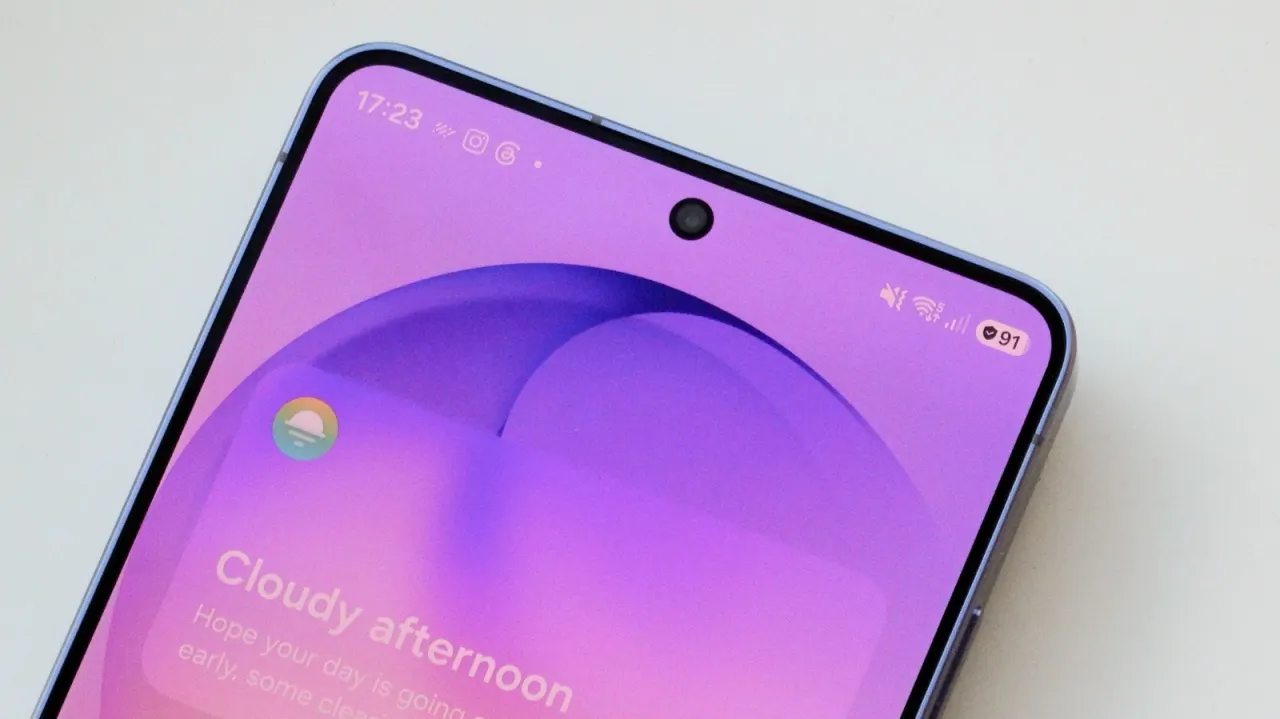
Samsung Galaxy's shield icon indicates Battery Protection is active, a feature that limits charging to extend battery lifespan rather than providing security. Modern lithium-ion batteries degrade faster when held at maximum charge, so limiting charge levels preserves battery health over years of use.
The feature includes three modes: Basic stops at 100% and resumes at 95%, Maximum allows users to choose caps from 80-95%, and Sleep Time Protection learns your schedule to charge at 80% overnight before topping up before wake time. Users can access Battery Protection in Settings under the Battery menu and adjust it whenever needed, making it particularly valuable for those who charge overnight or all day but less critical for those with inconsistent charging habits.
- Shield icon means Battery Protection is active, limiting charges
- Feature slows lithium-ion battery degradation for longer phone lifespan
- Users can customise charging caps or disable as needed
New here? Start with this
Modern smartphone batteries gradually lose their ability to hold charge over time, and this degradation accelerates when a battery is repeatedly charged to 100 per cent. Samsung's Battery Protection feature on Galaxy devices is designed to slow this natural decline by preventing batteries from spending too much time at maximum charge. Keeping batteries below full charge for extended periods helps them remain healthier over the years you own your phone.
The shield icon indicates this battery protection is currently active, though it does not signify security features. The feature allows users to set limits on how much their battery charges, such as capping it at 90 per cent or 80 per cent, and it can learn your charging schedule to apply these limits automatically at certain times. Users can access and adjust Battery Protection in their phone's Settings menu under Battery, enabling or disabling it as needed.
The protection is particularly valuable if you regularly charge your phone overnight or throughout the working day, since it prevents the battery from remaining at full capacity for extended periods. For those with inconsistent charging patterns, the practical benefit may be less obvious. The feature essentially trades the immediate convenience of instant full charge for a battery that remains healthier and performs better over time.
Read the full article at the source →
Originally published by Engadget as “What does the shield icon mean on your Samsung Galaxy?”.