How to track prices with Safari’s Notify Me tool on iPhone, iPad and Mac
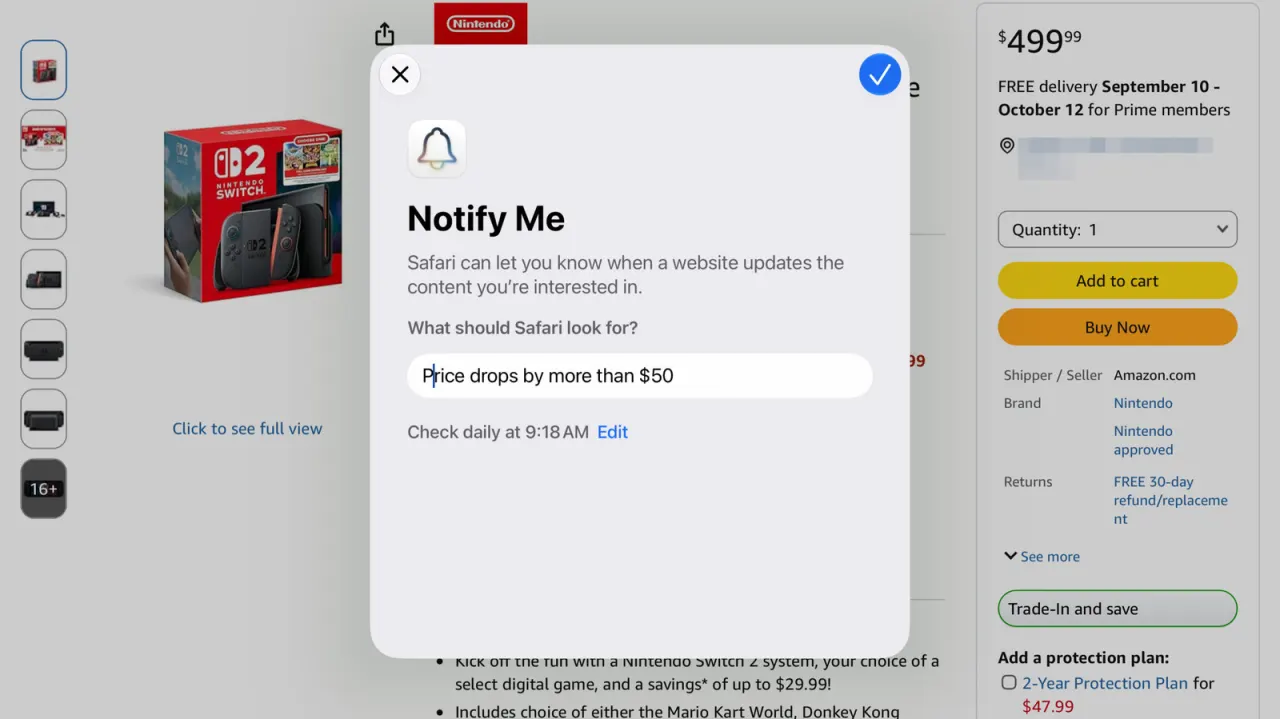
Apple's iOS 27 (also iPadOS 27 and macOS 27) includes a lesser-known Safari feature called Notify Me, which lets users track changes on any website—such as price drops, product restocks or ticket availability—directly within the browser, without needing third-party apps or extensions. Built into Safari's on-device processing rather than the cloud, it broadens the scope of what a native browser tool can monitor, extending beyond shopping to things like tour dates or ongoing news stories.
To set it up, users tap the menu icon in Safari's address bar, select Notify Me, and describe what they want tracked, before choosing how often the page should be checked (hourly, daily, weekly or monthly). Because monitoring happens on the device itself rather than via a cloud service, it must be configured on whichever device the user is most likely to see the alert on, such as an iPhone that is always carried with them. Alerts can later be edited or deleted from the same page or via Settings > Safari.
In short
- Safari's Notify Me tracks price drops and stock changes on any website.
- Built into iOS 27, iPadOS 27 and macOS 27, no extra apps needed.
- Runs on-device, so set it up on your most-used device.
Explained simply
Safari is Apple’s web browser, included on the iPhone, iPad and Mac. The reported Notify Me feature lets people ask Safari to watch a webpage for a change, such as a lower price, a restocked item or newly available tickets, without installing a separate app or extension.
Users choose what to look for and how often Safari should check the page. The monitoring happens on the device, so each alert needs to be set up on the device where the user wants to receive it; alerts can later be changed or removed.
This could make it easier to follow changes across shopping pages and other websites, such as tour dates or news coverage. Its usefulness depends on keeping the relevant device available to check pages and deliver alerts.
Business Gadgets Markets Software Technology