How to use Samsung’s new My FanCam feature to make yourself the main character in your videos
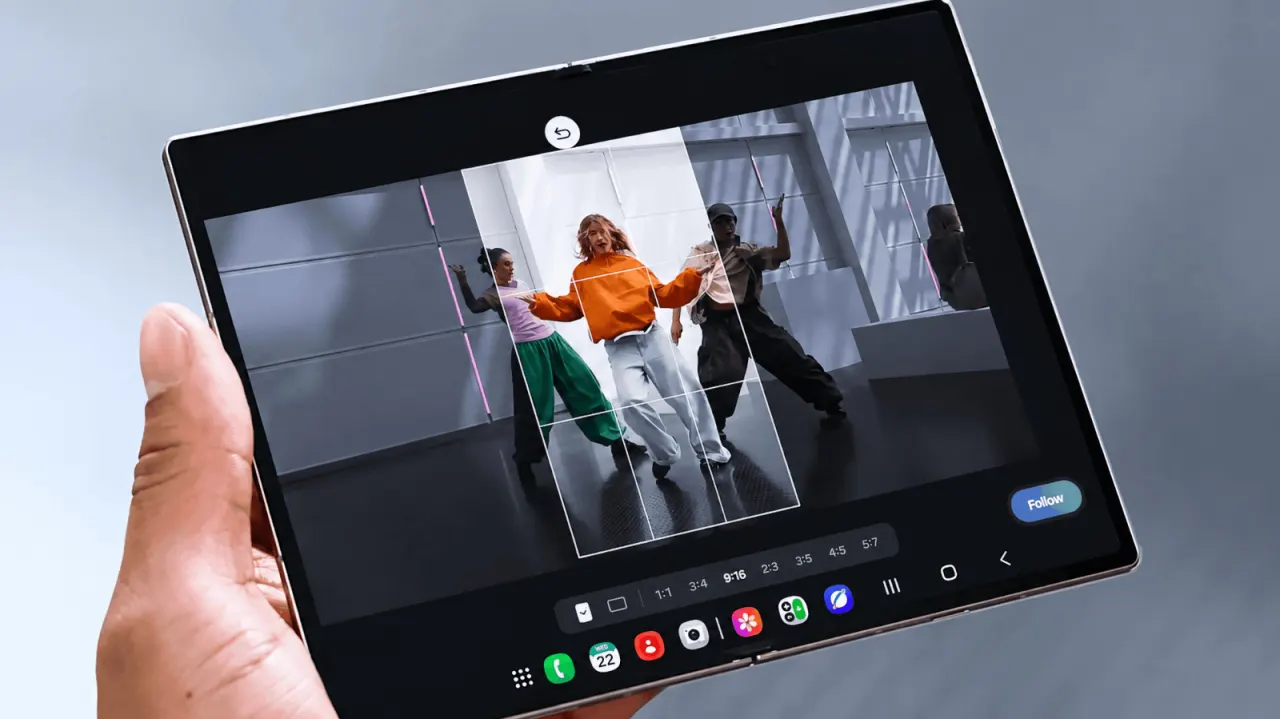
Samsung has introduced a new Gallery editing tool called My FanCam, which lets users retroactively turn a wide group video into a tighter clip that tracks a single person. Rather than requiring users to keep someone centred while filming, the Galaxy AI feature analyses footage already recorded, identifies the people in it, and reframes the shot around whichever person is chosen, in an aspect ratio selected afterwards. This is useful for unpredictable scenes such as school performances, sports matches or group dances, where constantly repositioning the camera during filming is impractical.
The feature works within Samsung's Gallery app: users open a video, tap the Galaxy AI icon, select My FanCam, choose a subject once Galaxy AI identifies the people present, pick an aspect ratio, then tap Follow to generate the reframed clip. It differs from Samsung's existing Auto framing tool, which adjusts composition live while recording, whereas My FanCam only works with footage already captured and cannot recover anything outside the original frame. Samsung is currently demonstrating the feature on the Galaxy Z Fold8 and Z Fold8 Ultra, part of the One UI 9 rollout that also includes the Galaxy Z Flip8, though Samsung notes individual AI features can vary by device, language and region, so My FanCam may not reach every phone that gets the update.
- Samsung's My FanCam reframes recorded video to track one chosen person
- Works after filming via Gallery app, unlike live Auto framing
- Debuts on Galaxy Z Fold8 series; availability varies by device/region
New here? Start with this
Smartphone videos are often filmed in a wide view to capture everyone in a busy scene. That can make it hard to keep one person in focus, especially at a school performance, sports match or group dance.
Samsung makes Galaxy phones and develops the Gallery app and Galaxy AI features used on some of them. Its Auto framing tool adjusts the view while recording; My FanCam works on a video that has already been filmed, letting the user choose someone for the app to follow in a tighter crop.
The crop can only show parts of the scene that were captured in the original video. AI features may also differ between phone models, languages and regions, so availability can vary.